NewKling 4.0 is liveTry it

Photo tool

Black and White Photo

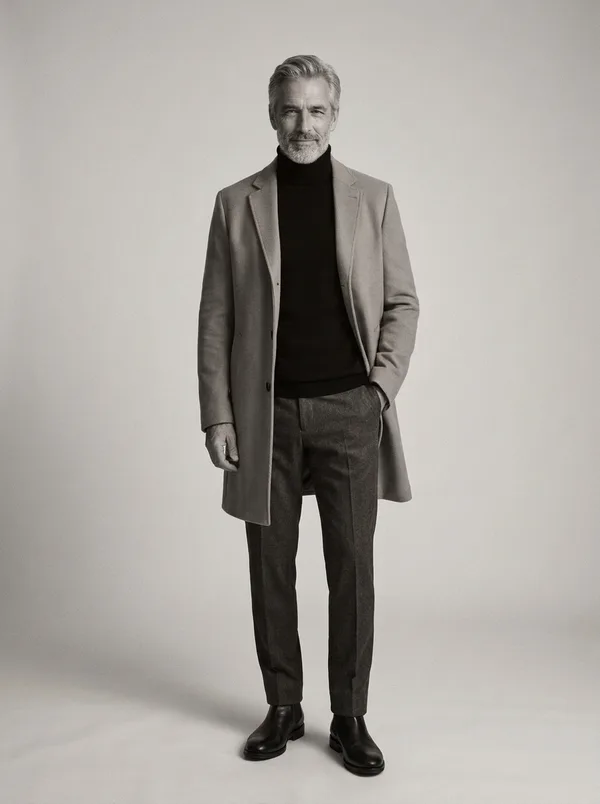
Black and White Photo turns one colour picture into a striking monochrome portrait: rich grey tones, deep blacks, soft silver highlights and fine film grain, like a classic gelatin silver print, while the prompt asks for the person, the outfit and the pose to stay as they were. Compare the original and the black and white version side by side on each card.

  • 2 prompts
  • Nano Banana 2.1

Updated By the Vidlark teamWorks in Google Gemini · ChatGPT

Black and white portrait with silver tones

Black and white portrait with silver tones

1 photo · Nano Banana 2.1 · 40 credits

What makes a good black and white photo?

Without colour, a portrait lives on light and contrast: the shape of a face, the texture of hair and fabric, how deep the shadows go. That is why photographers still print in black and white when they want a picture to feel timeless.

You could simply remove color from image files in any editor, and a plain black and white filter does just that. This prompt goes further and asks for the look of a darkroom print, deep blacks, silver highlights and fine grain, so the result reads as a black and white photograph rather than a grey copy of a colour one.

Make a black and white photo in three steps

One colour photo; the tones, the grain and the print look are in the prompt.

  1. 1Upload a photoOne adult, face clear and in good light; any colours.
  2. 2Pick a cardBoth cards use the same prompt: a silver-toned portrait and a softer one with fine grain.
  3. 3Press GenerateThe picture is saved in My creations; compare it with your original and download it.

The black and white prompt to copy

The one prompt behind both cards: copy it, or open it with your photo and press Generate.

Gelatin silver print

Turn the photo into a striking black-and-white portrait: rich monochrome tones, deep blacks, soft silver highlights and fine film grain, like a classic gelatin silver print, the person, outfit and pose unchanged. Photorealistic, vertical 3:4. No text, no logos, no watermark.

How to write a black and white photo prompt

  1. Name the look: “like a classic gelatin silver print”.
  2. Describe the tones: “rich monochrome tones, deep blacks, soft silver highlights”.
  3. Choose the grain: “fine film grain”, or “no grain” for a clean digital look.
  4. Keep the picture yours: “the person, outfit and pose unchanged”.
  5. Want more drama? Add “high contrast” or “strong side light”.

Google: Image generation with Gemini

At a glance

Price
40 credits a Nano Banana 2.1 image (1K)
Sign-up
No account needed to copy; an account is required to make it (free to create)
Photos
JPG, PNG or WebP, up to 10 MB
Watermark
On free credits; none on paid plans
Uploads
Private, deleted after 7 days, never used to train models

FAQ

Is it free to use these prompts?

Copying a prompt is free. Making it here uses 40 credits for one Nano Banana 2.1 image at 1K, so the 100 credits you get when you sign up make 2. On monthly plans Starter pays 32 credits an image and Pro 20. Unlimited makes Nano Banana 2.1 images without using credits.

What photo works best for a black and white photo?

A clear photo of one adult with good light and some shadow on the face; light from one side gives black and white the most shape. Busy colours matter less, since they all turn to grey.

Is this the same as a black and white filter?

A filter only drops the colour. This prompt asks the AI to re-make the photo as a monochrome print, with deep blacks, silver highlights and film grain, so the tones are chosen for black and white.

Does it change the person?

The prompt asks for the person, the outfit and the pose to stay unchanged. It is an AI re-make of the photo, so look at it next to your original before you use it.

Can I keep one colour?

Yes. Add it to the prompt, for example “everything black and white except the red dress”. Check the result, as the colour may spread a little.

Does it work on a photo without people?

Yes. Change “the person, outfit and pose unchanged” to “everything in the photo unchanged” for a street, a landscape or a product.

How long does it take?

About one to two minutes for one picture. It is saved in My creations, so you can leave the page while it works.

Do I need an account?

Not to read or copy a prompt. To make it here, sign up for a free account: the card, the prompt and your photos are still there when you come back.

More prompt categories

Open Nano Banana 2.1Negative space photography promptsChange PNG color promptsOld photo restoration promptsAI sketch generator promptsAI Halloween costume promptsHalloween AI photo promptsMichael Myers AI photo promptsKiller Klowns AI promptsZombie filter promptsGothic AI photo promptsSugar skull filter promptsRyuk AI promptsAI Lookbook promptsTurkish trio photo promptsBallon d'Or AI photo promptsCouple back tattoo promptsAI blonde hair filter promptsAI short hair filter promptsAI straight hair filter promptsAI wavy hair generator promptsAI buzz cut filter promptsBangs filter promptsChange eye color promptsAI eyebrow filter promptsNo beard filter promptsAI lip filler preview promptsCrayon AI photo promptsKorean baseball AI trend promptsVirtual ring try on promptsMotorcycle AI photo promptsAI vector generator prompts2D to 3D converter promptsGreen screen remover promptsPhoto to coloring page promptsComic book generator promptsBrainrot AI image generator promptsAI purikura filter prompts2D pixel sprite sheet promptsAI jewelry design promptsAI braids promptsGoth baddie generator promptsAI dreadlocks filter promptsStupid memes generator promptsRemove people from photos promptsAdd person to photo promptsAI product photo editor promptsAI product mockup generator promptsBlack Friday poster maker promptsPhoto to blueprint promptsTattoo stencil maker promptsRobot drone OC maker promptsAI birthday meme generator promptsSpeech bubble meme generator promptsAdd white background to photo promptsTeeth whitening photo editor promptsAI camera angle changer promptsAI selfie generator promptsSplit face with parents promptsHug my younger self AI promptsAdd a loved one to a photo promptsAI family photo generator promptsAI pregnant filter promptsAnime hero OC maker promptsDemon hunter OC maker promptsHedgehog OC maker promptsAI Bible image generator promptsRetro pinup filter promptsEmote maker promptsTombstone generator promptsAI smile generator promptsBraces filter promptsPiercing filter promptsCurly hair filter promptsAI long hair filter promptsAI pose changer promptsAI full body generator promptsAI Muppet generator promptsAI diorama generator promptsAI doll generator promptsAI Christmas card generator promptsAI birthday photoshoot promptsAI bald filter promptsAI hair color changer promptsAI outfit generator promptsAI pet portrait generator promptsLaser eyes meme promptsPhoto to claymation promptsPixel art converter prompts80s AI photo generator promptsAI sticker generator promptsAI mugshot maker promptsAI movie poster generator promptsAI album cover generator promptsAI gender swap promptsAI muscle generator promptsGhibli AI generator promptsAI action figure generator promptsPixar filter promptsAI aging filter promptsAI hairstyle changer promptsAI wanted poster generator promptsAI Polaroid generator promptsAI caricature generator promptsFemale Malfoy AI promptsPink Panther AI promptsJean Phil filter promptsDisney boyfriend filter promptsMultiverse filter promptsAI night club photos promptsSwirl effect photo promptsLong distance couple photo promptsMother and son AI photo promptsAI Pokemon generator promptsFlashlight AI photo promptsMinecraft AI photo promptsGTA style AI promptsDoomsday AI poster promptsWhat animal do I look like prompts90s yearbook AI promptsY3K AI filter promptsGhostface AI promptsPumpkin head photoshoot promptsVenom makeup promptsRose Halloween costume promptsSouth Park AI filter promptsAnime eye sticker promptsSpotlight filter promptsNano Banana promptsCouple photo promptsGemini AI photo promptsSaree promptsDiwali promptsTools
Trending AI video templates